Game State Management 是指管理主菜单界面, 游戏界面, 设置菜单界面, 游戏暂停界面等不同游戏状态之间的过渡与切换.
先看一个原始的版本: 使用goto, 联想到Flash中的gotoAndStop1
2
3
4
5
6
7
8
9
10
11
12
13
14
15
16
17
18
19
20
21
22
23
24
25
26
27
28
29
30
31
32
33
34
35
36
37
38
39
40
41
42
43
44
45
46
47
48
49
50
51
52
53
54
55
56
57
58
59
60
61
62
63
64
65
66
67
68
69
70
71
72
73
74
75
76
77
78
79
80
81namespace ScreenManager
{
/// <summary>
/// Screen Manager
/// Keeps a list of available screens
/// so you can switch between them,
/// ie. jumping from the start screen to the game screen
/// http://www.david-amador.com/2010/01/xna-screen-manager/
/// </summary>
public static class SCREEN_MANAGER
{
// Protected Members
static private List<Screen> _screens = new List<Screen>();
static private bool _started = false;
static private Screen _previous = null;
// Public Members
static public Screen ActiveScreen = null;
/// <summary>
/// Add new Screen
/// </summary>
/// <param name="screen">New screen, name must be unique</param>
static public void add_screen(Screen screen)
{
foreach (Screen scr in _screens)
{
if (scr.Name == screen.Name)
{
return;
}
}
_screens.Add(screen);
}
/// <summary>
/// Go to screen
/// </summary>
/// <param name="name">Screen name</param>
static public void goto_screen(string name)
{
foreach (Screen screen in _screens)
{
if (screen.Name == name)
{
// Shutsdown Previous Screen
_previous = ActiveScreen;
if (ActiveScreen != null)
{
ActiveScreen.Shutdown();
}
// Inits New Screen
ActiveScreen = screen;
if (_started) ActiveScreen.Init();
return;
}
}
}
/// <summary>
/// Updates Active Screen
/// </summary>
/// <param name="elapsed">GameTime</param>
static public void Update(GameTime gameTime)
{
if (_started == false) return;
if (ActiveScreen!=null)
{
ActiveScreen.Update(gameTime);
}
}
static public void Draw(GameTime gameTime)
{
if (_started == false) return;
if (ActiveScreen != null)
{
ActiveScreen.Draw(gameTime);
}
}
}
}
再看一个进阶的版本(http://blogs.msdn.com/b/etayrien/archive/2006/12/12/game-engine-structure.aspx)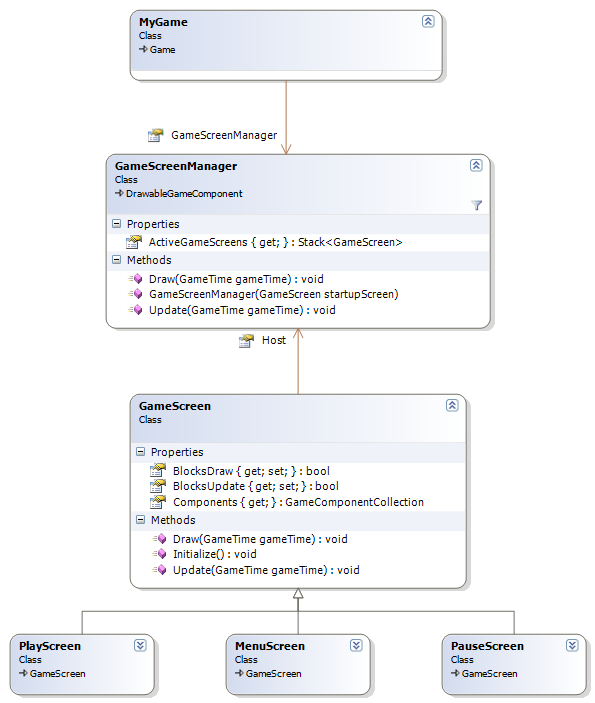
为什么使用Stack, 作者是这样说的:
so why a stack? Let’s say, for example, that when the user pauses the game, you just want to stop everything from updating, and put an image over the top of everything that says “Paused.” With a stack, that’s easy: you can just push a new PauseScreen onto the stack. When the user unpauses, pop the PauseScreen back off again. To implement the “everything still draws, but nothing updates” functionality, we’ll add two new properties to GameScreen. BlocksDraw says that no screens under this one can draw, and BlocksUpdate does the same thing for update.
对于Update, GameScreenManager自顶向下遍历Stack中的GameScreens, 调用它们的Update方法, 直到遇到BlocksUpdate为true.
对于Draw, 和Update有点不同. Draw本是自底向上绘制的, 先绘制下面的GameScreen, 再绘制上面的GameSreen. 而BlocksDraw 的意思是指, 当前GameScreen以下的GameScreen不绘制. 于是要先遍历一遍Stack中的GameScreens, 找到那些可见的GameScreen, 然后再对这些GameScreen以自底向上的方式进行绘制.
1 | List<GameScreen> screensToDraw = new List<GameScreen>(); |
如何进行状态切换呢
We saw above how pause would work: PlayScreen watches for the pause key, and pushes on a new PauseScreen. PauseScreen watches for pause button, and pops itself off. GameScreenManager’s constructor takes a GameScreen for the startup screen
注意这里的PlayScreen. 作者将游戏逻辑放在该GameScreen中. 也就是说游戏的GameScreen和各种菜单的GameScreen地位是等同的. XNA官方的样例RolePlayingGameStarterKit, 也是这样做的. 而在ZombieSmash中, 是将游戏状态先分为Playing和Menu, Menu下面再进一步细分
1 | public enum GameModes : int |
当处于GameModes.Menu模式时, 显示主菜单时不显示游戏画面, 如果是暂停和死亡, 仍然会显示游戏画面.